Remove tracking junk from links.
URLStrip strips known tracking parameters before you open a link, save it, or send it to someone else. It runs locally, supports iOS/iPadOS, macOS, and Windows, and is free to use.
Clean a URL Online Download URLStrip
A normal link often arrives with extra tracking parameters attached to it. URLStrip removes the known junk and keeps the destination intact.
Before:
https://example.com/article?utm_source=newsletter&utm_medium=email&fbclid=IwAR123&gclid=abc123
After:
https://example.com/article
Same destination. Less junk attached to it.
A lot of links carry extra baggage.
Copy a link from email, a search result, or social media, and there is a good chance it has extra tracking glued onto the end. Some of it measures campaigns, some of it identifies clicks. Some of it can even tie the link back to a person, browser, or session.
- Campaign tags — parameters like
utm_sourceandutm_campaignthat tell marketing systems where a click came from. - Click identifiers — values like
fbclidandgclidadded by major platforms to follow clicks across systems. - Other tracking codes — junk added by analytics, email, affiliate, and marketing systems.
The result is a cleaner link with less junk and less tracking attached to it. Want the deeper version? Read how URLStrip classifies tracking.
Clean links without breaking them.
URLStrip checks a link for known tracking parameters and strips out what doesn't need to be there. It keeps the parts the destination actually needs, including normal paths and parameters that control content or state.
What URLStrip removes:
- Common tracking parameters like
utm_* - Many click IDs and redirect wrappers
- Known junk added by advertising, analytics, and email systems
What URLStrip keeps:
- Normal paths and destination URLs
- Functional parameters needed for content or state
- The parts of the link that still need to work
Simple on purpose.
URLStrip is built to stay out of the way. On desktop, it fits into normal copy-and-paste use instead of asking you to route links through some service. The cleanup happens locally and the result is a cleaner link you can keep using normally.
- Install it. Install URLStrip for your platform and leave it there.
- Use links normally. Copy, paste, or share a link the same way you already do.
- Clean locally. URLStrip removes known tracking junk on the device itself.
- Keep moving. Open it, save it, or send it without dragging the junk along.
Some parameters are intentionally kept because they control content, preserve state, or are required for the destination to work.
Want to try it without installing anything? Use the browser-based URL cleaner. Your pasted URL is processed locally and is not sent to Tacita Labs.
The privacy model is simple.
- Runs locally. URLStrip cleans links on your device instead of routing them through someone else's cloud service.
- No account required. There is no login, subscription wall, or account setup just to clean a link.
- Rules-based approach. URLStrip is grounded in the ClearURLs ruleset and extended with maintained additions where they improve real-world results. Read how URLStrip classifies tracking.
- Built with relevant experience. Tacita Labs is building privacy tools with a practical, local-first bias shaped by years of security and privacy work.
Free to download and use.
URLStrip for iOS and iPadOS is available on the App Store. The TestFlight beta remains available for people who want the newest builds before they reach the public release. Current desktop releases are published through the public URLStrip release repository with direct download links and published SHA-256 hashes so people can verify the integrity of what they've downloaded.
iOS / iPadOS - App Store
Get the public URLStrip release from the App Store. TestFlight stays open for beta testers who want the newest builds.
macOS — Universal (Apple Silicon + Intel)
Download URLStrip 1.1 (Build 17) for macOS
SHA-256: d355f3c71552a1acffe465ec19a1378ef8187496df4bcd501ef08f5a94d1be20
Verify: shasum -a 256 URLStrip-1.1-macOS-universal.dmg
Includes an optional macOS command-line tool. Install it from Advanced Settings in the app.
Windows — x64
Download URLStrip 1.1 (Build 17) for Windows
SHA-256: 47bd1b4da2a2a6df4c47e2043c615ab0b78c95d5e49a33d7ab4b672796a5011f
Verify: certutil -hashfile URLStrip_1.1.0_x64-setup.exe sha256
Full checksum file: checksums/1.1.sha256
A real look at the app.
Real screenshots. No invented UI, no glossy mockups. Desktop stays lightweight and out of the way. iPhone makes cleanup, controls, and visibility easier.
 macOS onboarding and first-run explanation.
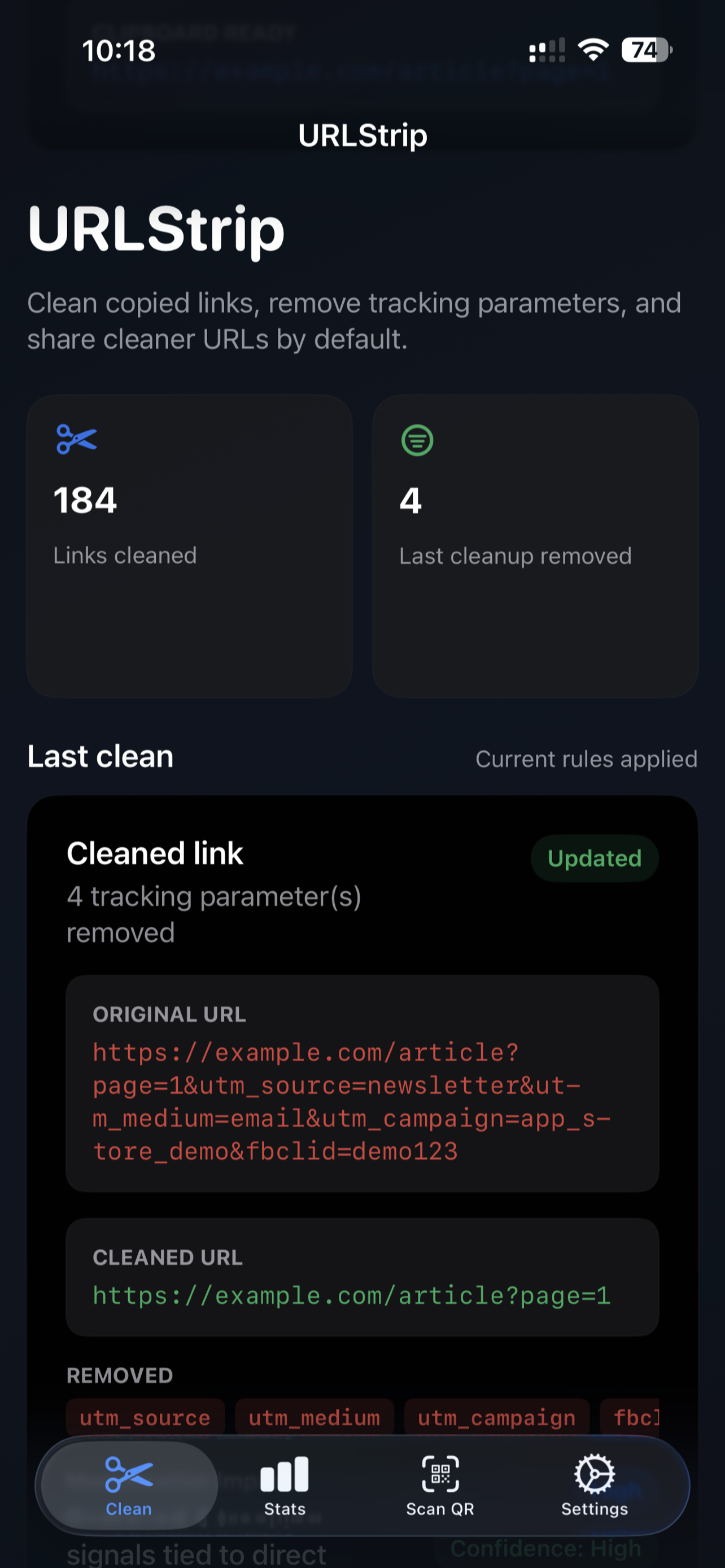 iPhone home view from the App Store release.


Built by Jim O'Gorman.
Jim O'Gorman spent nearly two decades helping build Offensive Security, working across leadership, training, product, operations, and community as the company grew through two exits.
Tacita Labs is focused on creating software that helps reduce unnecessary data exposure without creating another account, dashboard, or place your information has to go. The idea is simple: solve the problem without creating another one.
Short answers to obvious questions.
Does URLStrip send my links anywhere?
No. The point is to clean links locally instead of routing browsing data through another service.
Do I need an account?
No. Download it, install it, and use it.
Will it break links?
It is designed to remove known tracking junk while preserving the parts a link needs to work. Some parameters are intentionally kept when they affect content or function.
Why does iOS ask before pasting?
That prompt is an iOS privacy control, not a URLStrip setting. Apple requires apps to ask before reading the clipboard so you can decide when an app is allowed to access copied content. URLStrip cannot disable it, so expect to approve paste access when iOS asks.
Where do the rules come from?
URLStrip is grounded in the upstream ClearURLs ruleset and extended with additional maintained coverage where that improves practical results.
Why make another privacy tool?
Because too many privacy products solve one problem by creating another. Tacita Labs is focused on reducing exposure without demanding more of your data in return.
Contact
For product questions, feedback, or general inquiries, reach out at hello@tacitalabs.com or follow Tacita Labs on X.